
November 2025 Release Notes
Check out all of the improvements made in Scalr in November

Scalr.io
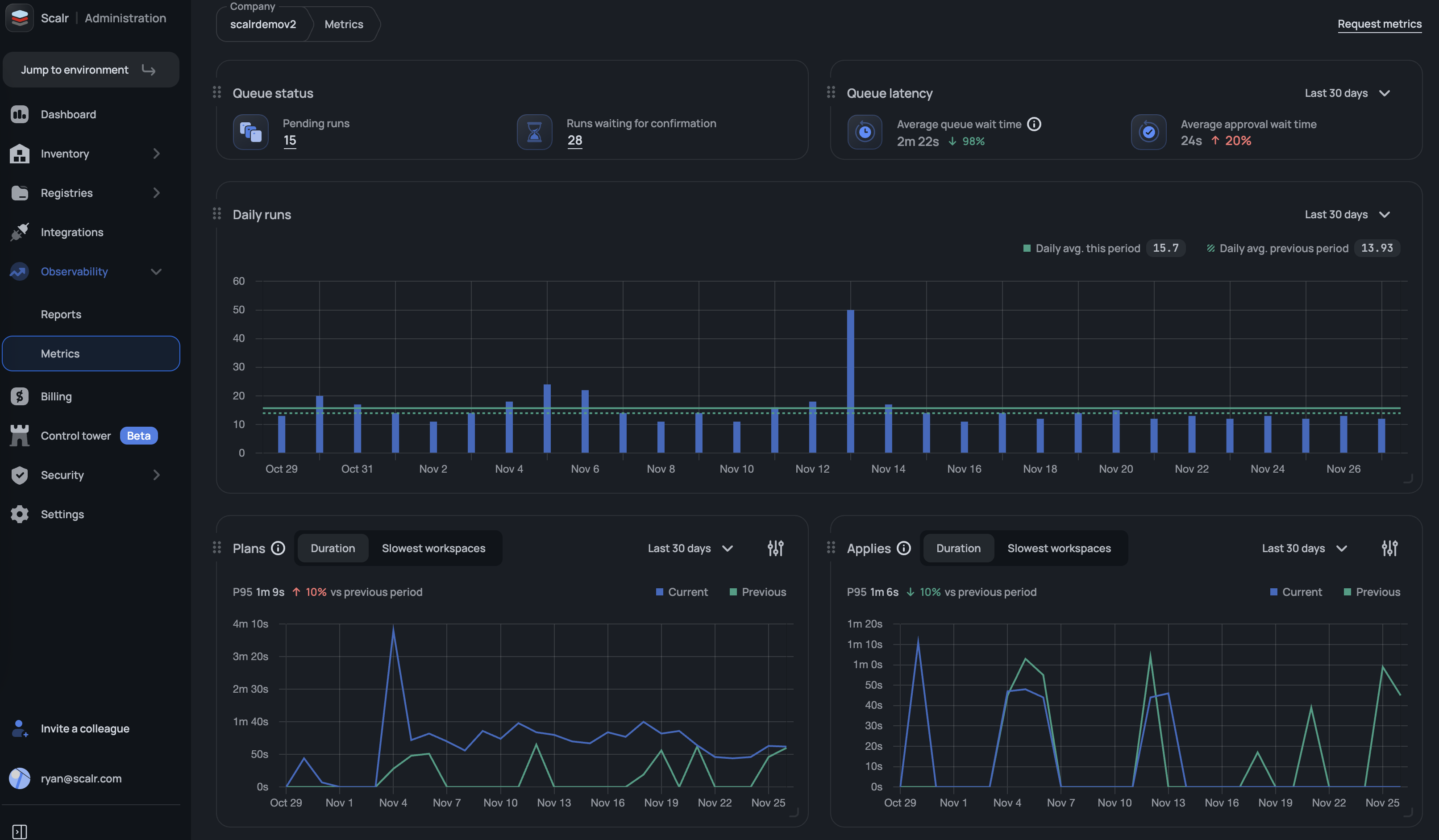
Scalr Metrics: Runs Queue
Scalr's new runs queue metrics dashboard provides platform teams with visibility into the runs queue health, displaying total queued runs, pending approvals, average queue wait times, and average approval wait times. Platform teams will now have a better understanding of the user experience for their developers and engineers. (November 27th, 2025/2511.25.0)
Drift Detection Run Mode
Scalr now offers two drift detection modes to give teams better control over infrastructure drift reporting. Choose "Refresh-only" mode to see all detected changes, including ignored attributes, or select "Plan" mode to respect ignore_changes rules. Configure your preferred mode in Environment → Drift Detection settings to reduce noise and make drift reports more actionable for your team. (November 27th, 2025/2511.25.0)
Added IAM Tools to the MCP Server
The following tools have been added to the MCP server to make it easier to look up information regarding users, teams, access policies, and more:
"get_access_policy",
"get_account",
"get_permission",
"get_role",
"get_service_account",
"get_team",
"get_user",
"get_workload_identity_provider",
"list_access_policies"
"list_permissions",
"list_roles",
"list_security_rules",
"list_service_accounts",
"list_sso_bypass_users",
"list_teams",
"list_users",
"list_workload_identity_providers"
(November 25th, 2025/2511.21.0)
Drift Detection - Limit Workspaces that Have Drift Enabled
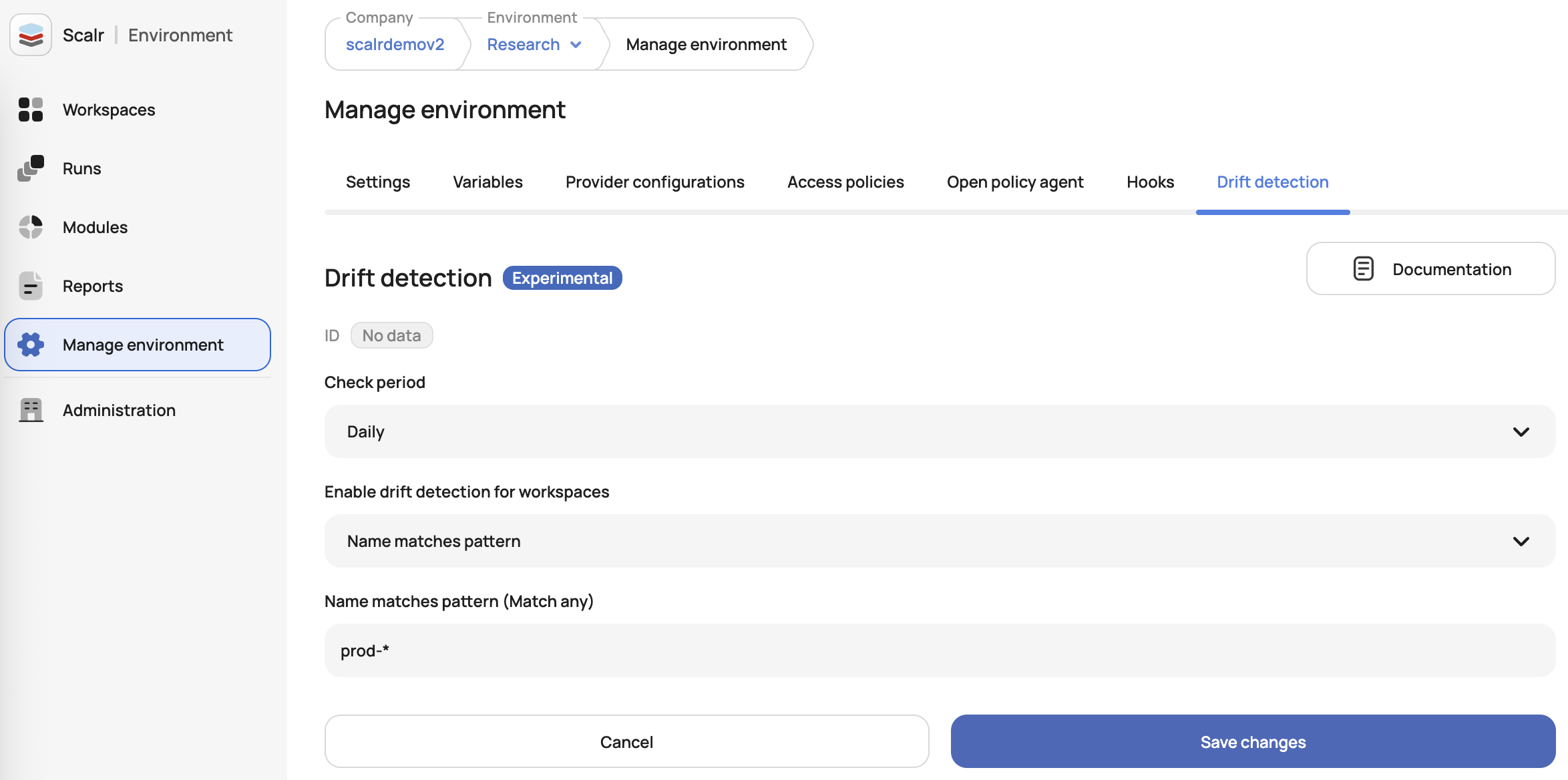
You can now apply filters for which workspaces Scalr checks for drift by using tags, environment types, or name patterns (using wildcards like prod-*). This reduces unnecessary notifications by limiting drift checks to workspaces matching your criteria. New workspaces are automatically evaluated against the configured filter without manual intervention. (November 20th, 2025/2511.18.0)
Restart Run Now Inherits Original Settings
The "Restart Run" feature now inherits all attributes from the original run (mode, Terraform version, auto-apply, target resources, parameters, etc) for quick re-execution of failed or completed runs without manual reconfiguration. Previously, users would have to re-enter all information, making the process inefficient. (November 20th, 2025/2511.18.0)
Provider Version Now Added to OPA Input
Users can now write OPA policies to check the version of a provider being used. Previously, only the provider name was passed in, but not the version. (November 18th, 2025/2511.14.0)
New Security Rule - Force Run Execution on Self-Hosted Agents
Admins can now enable a new security rule that requires all workspaces to run on self-hosted agents. When enabled, all new and existing workspaces must have a self-hosted agent pool configured to execute runs or save workspace updates. (November 11th, 2025/2511.7.0)
Block CLI Runs From Unverified Sources
We've enhanced the OPA evaluation payload with three new metadata fields in the tfrun.created_by section:
origin_ip- The source IP addressuser_agent- The client identifier from which the run was triggered (i.e. Terraform CLI or Scalr CLI)provider_configurations- The list of provider configs used in the workspace, including provider type, name, and ID.
This enables stricter governance by allowing OPA policies to verify runs originate only from approved CI/CD systems, networks, or automation tools, closing security gaps where service tokens could be used from untrusted environments. See example outputs here.(November 4th, 2025/2510.31.0)
Metrics - Added Rolling Average
Users now have the option to use a 7 or 14 day rolling average when viewing the plan and apply durations in Scalr metrics. Rolling averages are useful to spot whether trends are generally going up, down, or staying flat, even when individual data points are erratic. See more on metrics here. (November 4th, 2025/2510.31.0)
Apply Runs from PR Checks
GitHub users can now execute applies directly from GitHub checks. This is helpful when the apply failed, but the issue was unrelated to the Terraform/Tofu code, such as updates to provider permissions or new variables in the Scalr UI. This also reduces the amount of context switching a user needs to do when following the Atlantis style workflow by applying before merging. (November 4th, 2025/2510.31.0)
More Built-In Environment Variables
Two new built-in environment variables have been added, both available for use in Terraform/OpenTofu runs:
SCALR_IAC_PLATFORM- Indicates whether the run uses Terraform or OpenTofu.SCALR_RUN_VCS_REPOSITORY- Provides the VCS repository that the workspace is linked to.
These are helpful if there are custom hooks with scripts that have conditions based on the platform or repo. They can also be used to tag cloud resources. See all built-in variables here.(November 4th, 2025/2510.31.0)